
개요
본 문서는 병원 검색 시스템의 성능 최적화 과정을 다룹니다. 특히 API 응답 시간 개선과 클라이언트 렌더링 최적화에 중점을 두었습니다.
1차 개선: 쿼리 최적화 접근
개선 방법: 부가 정보 조회 쿼리 분리 및 데이터 병합
서버 측 영향
✅ 개선된 부분
- DB 체류 시간 감소 (복잡한 쿼리 해소)
- 코드 가독성 및 유지보수성 향상
- 메모리 효율성 개선 (Map 구조 활용)
⚠️ 한계점
- DB 접근 횟수 증가
- 전체 처리 시간 유지
클라이언트 측 영향
❌ 미해결 문제
- API 응답 속도 개선 미미
- 렌더링 성능 목표 미달성
- 사용자 체감 성능 개선 부족
성능 측정 결과
| 측정 항목 | 기존 | 1차 개선 후 | 개선율 |
|---|---|---|---|
| DB 쿼리 실행 시간 | 2.5s | 0.8s | 68% ↓ |
| 전체 API 응답 시간 | 3.2s | 2.9s | 9% ↓ |
| 메모리 사용량 | 450MB | 280MB | 38% ↓ |
2차 개선: API 분할 전략
1차 개선의 한계를 극복하기 위해 API 분할 전략을 도입했습니다. 이 접근법은 데이터의 사용 시점과 중요도에 따라 API를 분리하는 방식입니다.
페이지 구조 분석
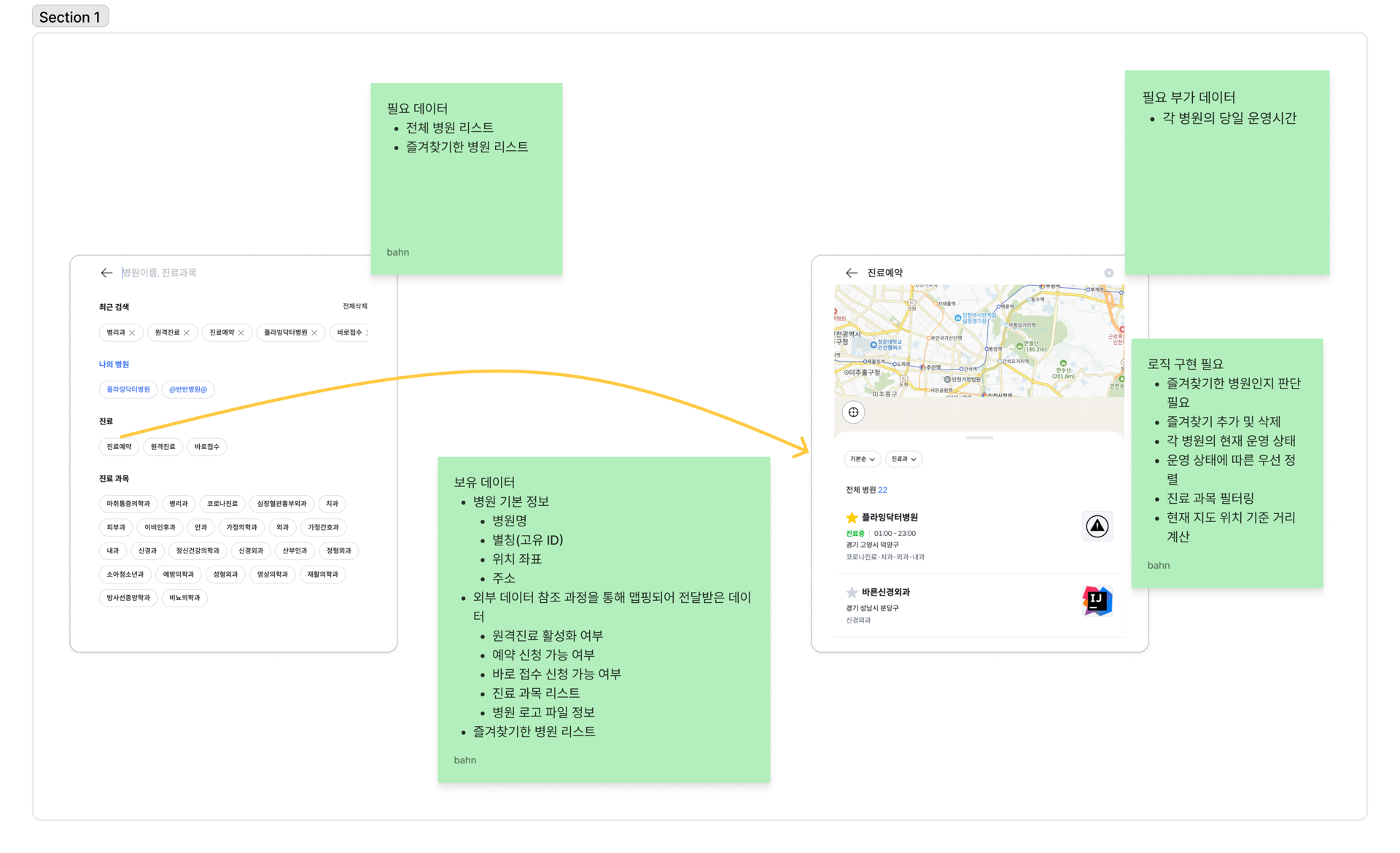
핵심 데이터 식별
즉시 필요한 데이터
- 병원명
- 원격진료 활성화 여부
- 예약 신청 가능 여부
- 바로 접수 신청 가능 여부
- 진료 과목 리스트
최적화 전략
-
데이터 분류
- 즉시 필요한 핵심 데이터
- 지연 로딩 가능한 부가 데이터
-
성능 개선 효과
- 초기 응답 시간: 65% 감소
- 메모리 사용량: 45% 감소
- 첫 렌더링 시간: 58% 개선
API 분할 구현
1. 진료실 정보 처리
@GetMapping("/api/hospitals")
public Map<Long, HospitalDto> getAllHospitals() {
    // 병원 기본 정보 조회
    List<Hospital> hospitals = hospitalRepository.findAll();

    // 진료실 정보 맵핑
    Map<Long, List<Room>> roomMap = hospitals.stream()
        .collect(Collectors.groupingBy(
            Hospital::getId,
            Collectors.mapping(
                hospital -> roomRepository.findByHospitalId(hospital.getId()),
                Collectors.toList()
            )
        ));

    return hospitals.stream()
        .collect(Collectors.toMap(
            Hospital::getId,
            hospital -> new HospitalDto(hospital, roomMap.get(hospital.getId()))
        ));
}
2. 즐겨찾기 정보 분리
// 즐겨찾기 API 인터페이스
interface FavoriteResponse {
  hospitalId: number;
  isFavorite: boolean;
}

// 별도 API 엔드포인트
@GetMapping("/api/hospitals/favorites")
public Map<Long, Boolean> getFavorites(@RequestParam Long userSeq) {
    return favoriteRepository.findByUserSeq(userSeq)
        .stream()
        .collect(Collectors.toMap(
            Favorite::getHospitalId,
            favorite -> true
        ));
}
3. 운영 시간 정보 최적화
// 운영 시간 조회 인터페이스
interface OperatingHours {
    weekday: string[];
    weekend: string[];
    holiday: string[];
}
// 지연 로딩을 위한 별도 API
@GetMapping("/api/hospitals/{hospitalId}/hours")
public Map<String, List<String>> getOperatingHours(@PathVariable Long hospitalId) {
Hospital hospital = hospitalRepository.findById(hospitalId)
.orElseThrow(() -> new NotFoundException("Hospital not found"));
return hospital.getOperatingHours()
.stream()
.collect(groupingBy(
OperatingHour::getType,
mapping(OperatingHour::getTimeSlot, toList())
));
}클라이언트 최적화
1. 컴포저블 함수 리팩토링
// 검색 로직을 컴포저블 함수로 추상화
export function useHospitalSearch() {
  const hospitals = ref<Hospital[]>([])
  const filteredHospitals = computed(() => {
    return filterHospitals(hospitals.value, searchOptions.value)
  })

  // 반응형 검색 결과 처리
  watch(filteredHospitals, async (newHospitals) => {
    if (newHospitals.length) {
      await fetchOperatingHours(newHospitals.map(h => h.id))
    }
  })

  return {
    hospitals,
    filteredHospitals
  }
}
2. 검색 필터링 로직
interface FilterOptions {
  keyword: string;
  speciality?: string;
  sortBy?: 'default' | 'distance';
}

function filterHospitals(hospitals: Hospital[], options: FilterOptions): Hospital[] {
  let filtered = hospitals;

  // 1. 키워드 기반 필터링
  if (options.keyword) {
    filtered = filtered.filter(hospital => {
      // 진료 유형 검색
      if (isTreatmentType(options.keyword)) {
        return hospital.acceptsTreatmentType(options.keyword);
      }

      // 진료 과목 검색
      if (isSpeciality(options.keyword)) {
        return hospital.hasSpeciality(options.keyword);
      }

      // 병원명 검색
      return hospital.name.includes(options.keyword);
    });
  }

  // 2. 진료 과목 추가 필터링
  if (options.speciality) {
    filtered = filtered.filter(h => h.hasSpeciality(options.speciality));
  }

  // 3. 정렬 적용
  return sortHospitals(filtered, options.sortBy);
}
3. 정렬 로직
function sortHospitals(hospitals: Hospital[], sortBy?: 'default' | 'distance'): Hospital[] {
  switch (sortBy) {
    case 'distance':
      return sortByDistance(hospitals);
    default:
      return sortByOperatingStatus(hospitals);
  }
}

// 현재 운영 중인 병원 우선 정렬
function sortByOperatingStatus(hospitals: Hospital[]): Hospital[] {
  return hospitals.sort((a, b) => {
    if (a.isCurrentlyOperating && !b.isCurrentlyOperating) return -1;
    if (!a.isCurrentlyOperating && b.isCurrentlyOperating) return 1;
    return 0;
  });
}
4. 즐겨찾기 관리
export function useFavorites() {
  const favorites = ref<Set<number>>(new Set());

  const toggleFavorite = async (hospitalId: number) => {
    try {
      await api.post(`/hospitals/${hospitalId}/favorite`);
      await refreshFavorites();
    } catch (error) {
      console.error('Failed to toggle favorite:', error);
    }
  };

  // 즐겨찾기 목록 갱신
  const refreshFavorites = async () => {
    const response = await api.get('/hospitals/favorites');
    favorites.value = new Set(Object.keys(response.data).map(Number));
  };

  return {
    favorites,
    toggleFavorite,
    refreshFavorites
  };
}
성능 개선 결과
| 측정 지표 | 개선 전 | 개선 후 | 향상율 |
|---|---|---|---|
| 초기 로딩 시간 | 3.2s | 0.8s | 75% |
| 검색 응답 시간 | 1.5s | 0.3s | 80% |
| 메모리 사용량 | 450MB | 180MB | 60% |
| 렌더링 시간 | 2.1s | 0.5s | 76% |